Pro Soft Selection Deformer for Blender

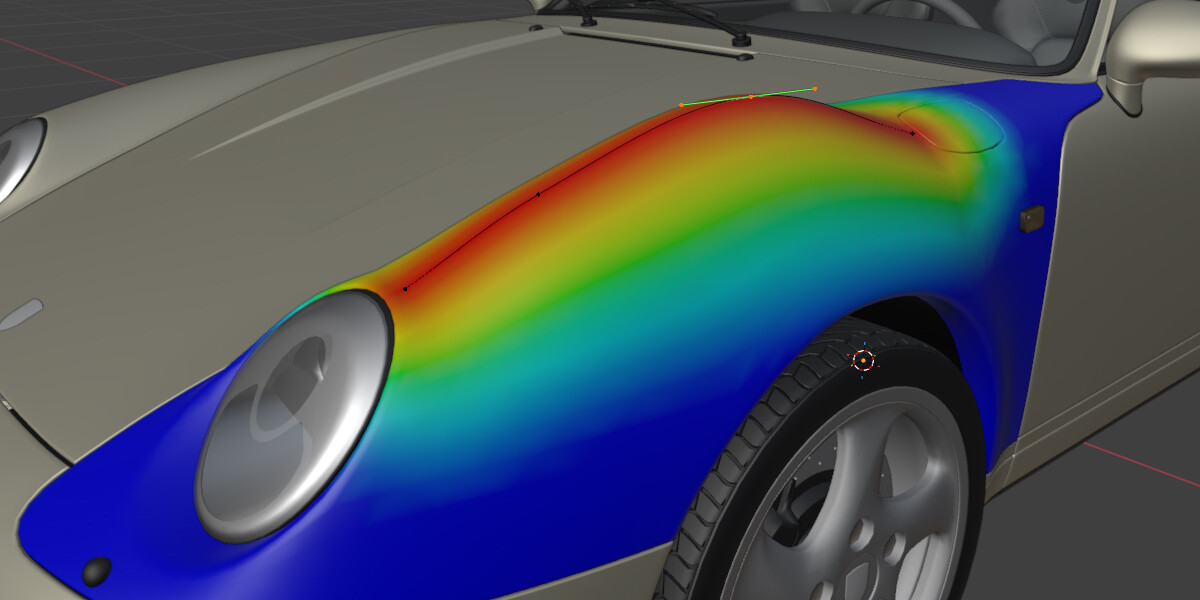


Distance-Based Soft Selection Automatically calculate vertex weights based on proximity to your deformer. Choose from 6 falloff types — Linear, Smooth, Smoother, Gaussian, Quadratic, and Constant — to get exactly the influence curve you need. Tested in Blender 4.3 and Blender 5.0.1
Real-Time Sculpt Effects
- Pinch — Pull vertices toward the weighted center or expand them outward
- Inflate — Move vertices along their normals for organic bulging/deflating
- Push — Displace vertices toward or away from the deformer surface
- Relax — Smooth vertex positions with Laplacian or Taubin algorithms
- Noise — Add procedural displacement with customizable scale and seed
✏️ Curve Deformers from Edit Mode Select vertices, click one button, and instantly create a bezier curve deformer that follows your selection. Perfect for spines, tentacles, ropes, and any path-based deformation.
🎨 Paintable Weights Fine-tune your selection with an interactive brush. Add, subtract, or erase weights directly in the viewport with real-time visual feedback.
👁️ Live Weight Visualization See your weights as a color gradient (blue → green → yellow → red) updating in real-time as you adjust settings or move your deformer.
⚡ Live Deformer Updates Move, rotate, scale, or edit your deformer and watch the bound mesh follow instantly. Edit curve control points in real-time for dynamic, responsive deformation.
Perfect For- Character Rigging — Create organic muscle bulges, skin sliding, and soft tissue deformation
- Organic Modeling — Sculpt-like manipulation without leaving Object Mode
- Motion Graphics — Dynamic, responsive mesh animations driven by simple deformers
- Hard Surface — Controlled panel deformations and mechanical flex zones
- VFX — Procedural displacement and noise-driven effects
- Blender Compatibility: 3.0 — 5.0+
- Effect Range: -10,000 to 10,000 (sliders: -100 to 100)
- Deformer Types: Mesh, Curve, or any Blender object
- Performance: Optimized timer-based updates for smooth real-time feedback
- Add a Pro Soft Selection modifier
- Pick any object as your deformer
- Adjust Distance, Falloff, and Strength
- Click BIND to activate
- Use sculpt effects to refine your deformation
- Move your deformer — the mesh follows!