Color ID Baker for Blender

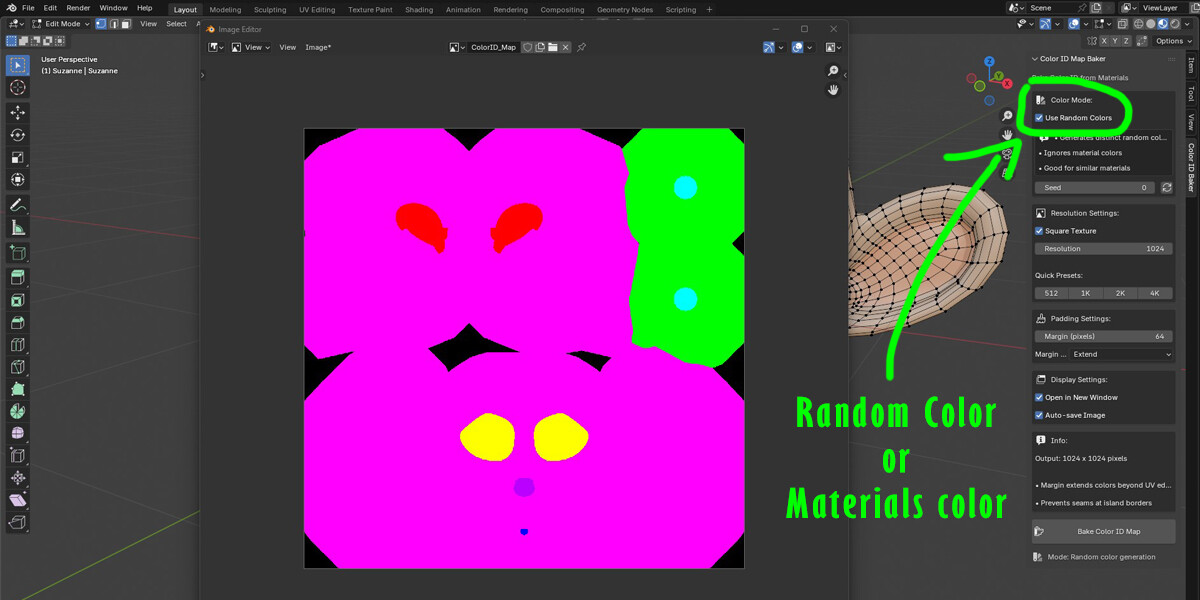


Color ID Map Baker is a Blender add-on that bakes material colors or random color palettes into a single Color ID texture map. It is designed for texturing workflows that require clean, distinct color regions, such as mask creation in Substance Painter or other texturing software.
FeaturesBake from existing material colors or generate random distinct colors.
Adjustable resolution (square or custom width/height).
Customizable padding/margin to avoid visible seams.
Margin type options: Extend or Adjacent Faces.
Random color seed for reproducible results.
Auto-save baked images to file.
Option to open the result in a new Image Editor window.
Quick resolution presets (512, 1K, 2K, 4K).
Download the add-on .zip file or the Python .py script.
In Blender, go to Edit > Preferences > Add-ons.
Click Install... and select the file.
Enable Color ID Map Baker in the add-ons list.
View3D > Sidebar > Color ID Baker Tab
How to Use-
Prepare Your Model
Ensure your mesh has a UV map.
Assign materials to the mesh.
-
Select Color Mode
Use Material Colors – Preserves the appearance of your materials.
Use Random Colors – Generates distinct colors for each material slot.
-
Set Resolution
Choose a square texture or define custom width and height.
Use quick presets for convenience.
-
Adjust Padding/Margin
Set the margin in pixels to extend colors beyond UV island borders.
Choose margin type: Extend or Adjacent Faces.
-
Display & Save Options
Enable Open in New Window to view results immediately.
Enable Auto-save Image to automatically save the baked texture to your .blend file directory.
-
Bake
Click Bake Color ID Map to generate your texture.
The image will appear in the Image Editor or a new window depending on your settings.
Use Random Colors mode when materials have similar shades to make mask creation easier.
Increase Margin for complex UV layouts to prevent seam artifacts.
Save your .blend file before baking if you want to use Auto-save.